群組
OpenClaw 在所有平台上均一致地處理群組聊天:WhatsApp、Telegram、Discord、Slack、Signal、iMessage、Microsoft Teams。
初學者簡介 (2 分鐘)
Section titled “初學者簡介 (2 分鐘)”OpenClaw 「駐留」在您自己的通訊帳戶上。沒有獨立的 WhatsApp 機器人用戶。 如果您在群組中,OpenClaw 就能看到該群組並在那裡回應。
預設行為:
- 群組受到限制 (
groupPolicy: "allowlist")。 - 回覆需要提及,除非您明確停用提及門控。
翻譯:允許清單中的發送者可以透過提及來觸發 OpenClaw。
TL;DR
- DM 存取權由
*.allowFrom控制。- 群組存取權由
*.groupPolicy+ 允許清單 (*.groups,*.groupAllowFrom) 控制。- 回覆觸發由提及門控 (
requireMention,/activation) 控制。
快速流程 (群組訊息會發生什麼事):
groupPolicy? disabled -> dropgroupPolicy? allowlist -> group allowed? no -> droprequireMention? yes -> mentioned? no -> store for context onlyotherwise -> reply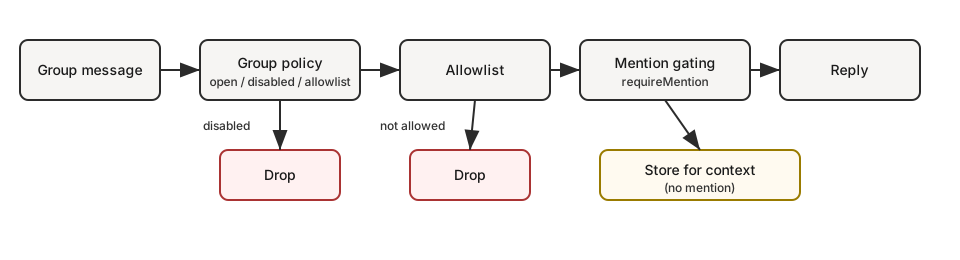
如果您想要…
| 目標 | 設定方式 |
|---|---|
| 允許所有群組但僅在 @提及時回覆 | groups: { "*": { requireMention: true } } |
| 停用所有群組回覆 | groupPolicy: "disabled" |
| 僅限特定群組 | groups: { "<group-id>": { ... } } (沒有 "*" 鍵) |
| 只有您能在群組中觸發 | groupPolicy: "allowlist", groupAllowFrom: ["+1555..."] |
- 群組會話使用
agent:<agentId>:<channel>:group:<id>會話金鑰 (房間/頻道使用agent:<agentId>:<channel>:channel:<id>)。 - Telegram 論壇主題會將
:topic:<threadId>加入群組 ID,因此每個主題都有自己的會話。 - 直接聊天使用主會話 (若已設定,則為每個發送者一個會話)。
- 群組會話會跳過心跳檢測。
模式:個人 DM + 公開群組 (單一代理程式)
Section titled “模式:個人 DM + 公開群組 (單一代理程式)”是的 — 如果您的「個人」流量是 DMs 而「公開」流量是 groups,這運作得很好。
原因:在單一代理模式下,DM(私訊)通常會落在 main(主要)會話金鑰 (agent:main:main),而群組則總是使用 non-main(非主要)會話金鑰 (agent:main:<channel>:group:<id>)。如果您透過 mode: "non-main" 啟用沙盒機制,這些群組會話將在 Docker 中執行,而您的主要 DM 會話則保持在主機上。
這為您提供了一個代理「大腦」(共享工作區 + 記憶體),但具有兩種執行模式:
- DM:完整工具(主機)
- 群組:沙盒 + 受限工具(Docker)
如果您需要真正分離的工作區/人格(「個人」和「公開」絕不能混合),請使用第二個代理 + 綁定。請參閱多代理路由。
範例(DM 在主機上,群組在沙盒內 + 僅限訊息傳遞工具):
{ agents: { defaults: { sandbox: { mode: "non-main", // groups/channels are non-main -> sandboxed scope: "session", // strongest isolation (one container per group/channel) workspaceAccess: "none", }, }, }, tools: { sandbox: { tools: { // If allow is non-empty, everything else is blocked (deny still wins). allow: ["group:messaging", "group:sessions"], deny: ["group:runtime", "group:fs", "group:ui", "nodes", "cron", "gateway"], }, }, },}想要「群組只能看到資料夾 X」而不是「無主機存取權」?請保留 workspaceAccess: "none" 並且僅將允許清單中的路徑掛載到沙盒中:
{ agents: { defaults: { sandbox: { mode: "non-main", scope: "session", workspaceAccess: "none", docker: { binds: [ // hostPath:containerPath:mode "~/FriendsShared:/data:ro", ], }, }, }, },}相關:
- 配置金鑰與預設值:Gateway 配置
- 偵錯工具為何被封鎖:沙盒 vs 工具政策 vs 提升權限
- 綁定掛載細節:沙盒機制
- UI 標籤在可用時使用
displayName,格式為<channel>:<token>。 #room是保留給 房間/頻道 使用的;群組聊天則使用g-<slug>(小寫,空格轉換為-,保留#@+._-)。
控制每個頻道如何處理群組/房間訊息:
{ channels: { whatsapp: { groupPolicy: "disabled", // "open" | "disabled" | "allowlist" groupAllowFrom: ["+15551234567"], }, telegram: { groupPolicy: "disabled", groupAllowFrom: ["123456789", "@username"], }, signal: { groupPolicy: "disabled", groupAllowFrom: ["+15551234567"], }, imessage: { groupPolicy: "disabled", groupAllowFrom: ["chat_id:123"], }, msteams: { groupPolicy: "disabled", }, discord: { groupPolicy: "allowlist", guilds: { GUILD_ID: { channels: { help: { allow: true } } }, }, }, slack: { groupPolicy: "allowlist", channels: { "#general": { allow: true } }, }, matrix: { groupPolicy: "allowlist", groupAllowFrom: ["@owner:example.org"], groups: { "!roomId:example.org": { allow: true }, "#alias:example.org": { allow: true }, }, }, },}| 政策 | 行為 |
|---|---|
"open" | 群組繞過允許清單;提及閘門仍然適用。 |
"disabled" | 完全封鎖所有群組訊息。 |
"allowlist" | 僅允許符合設定允許清單的群組/房間。 |
註記:
groupPolicy與提及閘門(這需要 @提及)是分開的。- WhatsApp/Telegram/Signal/iMessage/Microsoft Teams:使用
groupAllowFrom(後備:明確的allowFrom)。 - Discord:允許清單使用
channels.discord.guilds.<id>.channels。 - Slack:允許清單使用
channels.slack.channels。 - Matrix:允許清單使用
channels.matrix.groups(房間 ID、別名或名稱)。使用channels.matrix.groupAllowFrom限制發送者;也支援每個房間users允許清單。 - 群組 DM 受單獨控制(
channels.discord.dm.*、channels.slack.dm.*)。 - Telegram 允許清單可以匹配使用者 ID(
"123456789"、"telegram:123456789"、"tg:123456789")或使用者名稱("@alice"或"alice");前綴不區分大小寫。 - 預設值為
groupPolicy: "allowlist";如果您的群組允許清單為空,則群組訊息將被封鎖。
快速思維模型(群組訊息的評估順序):
groupPolicy(open/disabled/allowlist)- 群組允許清單(
*.groups、*.groupAllowFrom、特定頻道允許清單) - 提及閘控(
requireMention、/activation)
提及閘控(預設)
Section titled “提及閘控(預設)”除非每個群組單獨覆蓋,否則群組訊息需要提及。預設值按子系統位於 *.groups."*" 下。
回覆機器人訊息算作隱式提及(當頻道支援回覆元資料時)。這適用於 Telegram、WhatsApp、Slack、Discord 和 Microsoft Teams。
{ channels: { whatsapp: { groups: { "*": { requireMention: true }, }, }, telegram: { groups: { "*": { requireMention: true }, "123456789": { requireMention: false }, }, }, imessage: { groups: { "*": { requireMention: true }, "123": { requireMention: false }, }, }, }, agents: { list: [ { id: "main", groupChat: { mentionPatterns: ["@openclaw", "openclaw", "\\+15555550123"], historyLimit: 50, }, }, ], },}備註:
mentionPatterns是不區分大小寫的正規表達式。- 提供明確提及的介面仍然會通過;模式是備用方案。
- 每個代理程式覆蓋:
agents.list[].groupChat.mentionPatterns(當多個代理程式共用一個群組時很有用)。 - 僅當可以進行提及偵測時(配置了原生提及或
mentionPatterns),才會執行提及閘控。 - Discord 預設值位於
channels.discord.guilds."*"中(可按伺服器/頻道覆蓋)。 - 群組歷史記錄上下文在各頻道間統一包裝,且僅限待處理(因提及閘控而跳過的訊息);使用
messages.groupChat.historyLimit作為全域預設值,使用channels.<channel>.historyLimit(或channels.<channel>.accounts.*.historyLimit)進行覆蓋。設定0以停用。
群組/頻道工具限制(可選)
Section titled “群組/頻道工具限制(可選)”部分通道配置支援限制在特定群組/房間/頻道內可使用的工具。
tools:允許/拒絕整個群組的工具。toolsBySender:群組內每個發送者的覆寫設定(鍵值為發送者 ID/使用者名稱/電子郵件/電話號碼,視通道而定)。使用"*"作為萬用字元。
解析順序(最特定者優先):
- 群組/頻道
toolsBySender符合 - 群組/頻道
tools - 預設 (
"*")toolsBySender符合 - 預設 (
"*")tools
範例 (Telegram):
{ channels: { telegram: { groups: { "*": { tools: { deny: ["exec"] } }, "-1001234567890": { tools: { deny: ["exec", "read", "write"] }, toolsBySender: { "123456789": { alsoAllow: ["exec"] }, }, }, }, }, },}備註:
- 群組/頻道工具限制會與全域/代理工具策略一併套用(拒絕仍優先)。
- 部分通道對房間/頻道使用不同的巢狀結構(例如,Discord
guilds.*.channels.*、Slackchannels.*、MS Teamsteams.*.channels.*)。
群組允許清單
Section titled “群組允許清單”當設定 channels.whatsapp.groups、channels.telegram.groups 或 channels.imessage.groups 時,這些鍵值即作為群組允許清單。使用 "*" 以允許所有群組,同時仍設定預設提及行為。
常見意圖 (複製/貼上):
- 停用所有群組回覆
{ channels: { whatsapp: { groupPolicy: "disabled" } },}- 僅允許特定群組 (WhatsApp)
{ channels: { whatsapp: { groups: { }, }, },}- 允許所有群組但要求提及 (明確)
{ channels: { whatsapp: { groups: { "*": { requireMention: true } }, }, },}- 僅擁有者可在群組中觸發 (WhatsApp)
{ channels: { whatsapp: { groupPolicy: "allowlist", groupAllowFrom: ["+15551234567"], groups: { "*": { requireMention: true } }, }, },}啟用 (僅限擁有者)
Section titled “啟用 (僅限擁有者)”群組擁有者可以切換各群組的啟用狀態:
/activation mention/activation always
擁有者由 channels.whatsapp.allowFrom 決定(若未設定則為機器人自身的 E.164)。將指令作為獨立訊息發送。其他介面目前會忽略 /activation。
Context 欄位
Section titled “Context 欄位”群組輸入 Payload 會設定:
ChatType=groupGroupSubject(如果已知)GroupMembers(如果已知)WasMentioned(提及閘道結果)- Telegram 論壇主題也包含
MessageThreadId和IsForum。
代理系統提示在新群組會話的第一輪中包含群組介紹。它提醒模型像人類一樣回應,避免使用 Markdown 表格,並避免輸入字面意義的 \n 序列。
iMessage 詳情
Section titled “iMessage 詳情”- 在路由或建立允許清單時,優先使用
chat_id:<id>。 - 列出聊天:
imsg chats --limit 20。 - 群組回覆總是會發回同一個
chat_id。
WhatsApp 詳情
Section titled “WhatsApp 詳情”請參閱 群組訊息 以了解 WhatsApp 專屬行為(歷史記錄注入、提及處理細節)。