Groups
OpenClaw treats group chats consistently across surfaces: Discord, iMessage, Matrix, Microsoft Teams, QQBot, Signal, Slack, Telegram, WhatsApp, Zalo.
For always-on rooms that should provide quiet context unless the agent explicitly sends a visible message, see Ambient room events.
Beginner intro (2 minutes)
Section titled “Beginner intro (2 minutes)”OpenClaw “lives” on your own messaging accounts. There is no separate WhatsApp bot user. If you are in a group, OpenClaw can see that group and respond there.
Default behavior:
- Groups are restricted (
groupPolicy: "allowlist"). - Replies require a mention unless you explicitly disable mention gating.
- Visible replies in groups/channels use the
messagetool by default.
Translation: allowlisted senders can trigger OpenClaw by mentioning it.
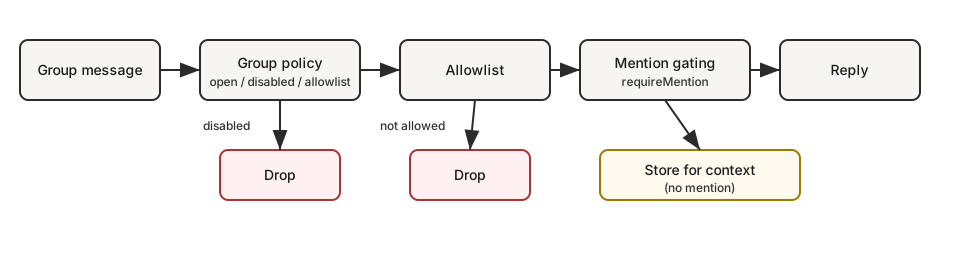
Quick flow (what happens to a group message):
groupPolicy? disabled -> dropgroupPolicy? allowlist -> group allowed? no -> droprequireMention? yes -> mentioned? no -> store for context onlymention/reply/command/DM -> user requestalways-on group chatter -> user request, or room event when configuredVisible replies
Section titled “Visible replies”For normal group/channel requests, OpenClaw defaults to messages.groupChat.visibleReplies: "automatic". Final assistant text posts through the legacy visible reply path unless you opt the room into message-tool-only output.
Use messages.groupChat.visibleReplies: "message_tool" when a shared room should let the agent decide when to speak by calling message(action=send). This works best for group rooms backed by latest-generation, tool-reliable models such as GPT 5.5. If the model misses that tool and returns substantive final text, OpenClaw keeps that final text private instead of posting it to the room.
Use "automatic" for weaker models or runtimes that do not reliably understand tool-only delivery. In automatic mode, the agent’s final assistant text is the visible source reply path, so a model that cannot consistently call message(action=send) can still answer normally.
In automatic mode, normal text final replies are posted directly to the room. If the visible reply needs files, images, or other attachments, the agent may still use message(action=send) for that attachment instead of trying to force it through the final text reply.
If the message tool is unavailable under the active tool policy, OpenClaw falls
back to automatic visible replies instead of silently suppressing the response.
openclaw doctor warns about this mismatch.
For direct chats and any other source event, use messages.visibleReplies: "message_tool" to apply the same tool-only visible-reply behavior globally. Internal WebChat direct turns default to automatic final-reply delivery so Pi and Codex receive the same visible-reply contract. Set messages.visibleReplies: "message_tool" to intentionally require message(action=send) for visible output. messages.groupChat.visibleReplies remains the more specific override for group/channel rooms.
This replaces the old pattern of forcing the model to answer NO_REPLY for most lurk-mode turns. In tool-only mode, the prompt does not define a NO_REPLY contract. Doing nothing visible simply means not calling the message tool.
Plugin-owned conversation bindings are the exception. Once a plugin binds a thread and claims the inbound turn, the plugin’s returned reply is the visible binding response; it does not need message(action=send). That reply is plugin runtime output, not private model final text.
Typing indicators are still sent for direct group requests. Ambient always-on room events, when enabled, stay strict and quiet unless the agent calls the message tool.
Sessions suppress verbose tool/progress summaries by default. Use /verbose on
to show those summaries for the current session while debugging, and
/verbose off to return to final-reply-only behavior. The same verbose state
applies across direct chats, groups, channels, and forum topics.
To submit unmentioned always-on group chatter as quiet room context instead of user requests, use Ambient room events:
{ messages: { groupChat: { unmentionedInbound: "room_event", }, },}The default is unmentionedInbound: "user_request".
Mentioned messages, commands, abort requests, and DMs stay user requests.
To require visible output to go through the message tool for group/channel requests:
{ messages: { groupChat: { visibleReplies: "message_tool", }, },}The gateway hot-reloads messages config after the file is saved. Restart only
when file watching or config reload is disabled in the deployment.
To require visible output to go through the message tool for every source chat:
{ messages: { visibleReplies: "message_tool", },}Native slash commands (Discord, Telegram, and other surfaces with native command support) bypass visibleReplies: "message_tool" and always reply visibly so the channel-native command UI gets the response it expects. This applies to validated native command turns only; text-typed /... commands and ordinary chat turns still follow the configured group default.
Context visibility and allowlists
Section titled “Context visibility and allowlists”Two different controls are involved in group safety:
- Trigger authorization: who can trigger the agent (
groupPolicy,groups,groupAllowFrom, channel-specific allowlists). - Context visibility: what supplemental context is injected into the model (reply text, quotes, thread history, forwarded metadata).
By default, OpenClaw prioritizes normal chat behavior and keeps context mostly as received. This means allowlists primarily decide who can trigger actions, not a universal redaction boundary for every quoted or historical snippet.
Current behavior is channel-specific
- Some channels already apply sender-based filtering for supplemental context in specific paths (for example Slack thread seeding, Matrix reply/thread lookups).
- Other channels still pass quote/reply/forward context through as received.
Hardening direction (planned)
contextVisibility: "all"(default) keeps current as-received behavior.contextVisibility: "allowlist"filters supplemental context to allowlisted senders.contextVisibility: "allowlist_quote"isallowlistplus one explicit quote/reply exception.
Until this hardening model is implemented consistently across channels, expect differences by surface.
If you want…
| Goal | What to set |
|---|---|
| Allow all groups but only reply on @mentions | groups: { "*": { requireMention: true } } |
| Disable all group replies | groupPolicy: "disabled" |
| Only specific groups | groups: { "<group-id>": { ... } } (no "*" key) |
| Only you can trigger in groups | groupPolicy: "allowlist", groupAllowFrom: ["+1555..."] |
| Reuse one trusted sender set across channels | groupAllowFrom: ["accessGroup:operators"] |
For reusable sender allowlists, see Access groups.
Session keys
Section titled “Session keys”- Group sessions use
agent:<agentId>:<channel>:group:<id>session keys (rooms/channels useagent:<agentId>:<channel>:channel:<id>). - Telegram forum topics add
:topic:<threadId>to the group id so each topic has its own session. - Direct chats use the main session (or per-sender if configured).
- Heartbeats are skipped for group sessions.
Pattern: personal DMs + public groups (single agent)
Section titled “Pattern: personal DMs + public groups (single agent)”Yes — this works well if your “personal” traffic is DMs and your “public” traffic is groups.
Why: in single-agent mode, DMs typically land in the main session key (agent:main:main), while groups always use non-main session keys (agent:main:<channel>:group:<id>). If you enable sandboxing with mode: "non-main", those group sessions run in the configured sandbox backend while your main DM session stays on-host. Docker is the default backend if you do not choose one.
This gives you one agent “brain” (shared workspace + memory), but two execution postures:
- DMs: full tools (host)
- Groups: sandbox + restricted tools
{ agents: { defaults: { sandbox: { mode: "non-main", // groups/channels are non-main -> sandboxed scope: "session", // strongest isolation (one container per group/channel) workspaceAccess: "none", }, }, }, tools: { sandbox: { tools: { // If allow is non-empty, everything else is blocked (deny still wins). allow: ["group:messaging", "group:sessions"], deny: ["group:runtime", "group:fs", "group:ui", "nodes", "cron", "gateway"], }, }, },}Want “groups can only see folder X” instead of “no host access”? Keep workspaceAccess: "none" and mount only allowlisted paths into the sandbox:
{ agents: { defaults: { sandbox: { mode: "non-main", scope: "session", workspaceAccess: "none", docker: { binds: [ // hostPath:containerPath:mode "/home/user/FriendsShared:/data:ro", ], }, }, }, },}Related:
- Configuration keys and defaults: Gateway configuration
- Debugging why a tool is blocked: Sandbox vs Tool Policy vs Elevated
- Bind mounts details: Sandboxing
Display labels
Section titled “Display labels”- UI labels use
displayNamewhen available, formatted as<channel>:<token>. #roomis reserved for rooms/channels; group chats useg-<slug>(lowercase, spaces ->-, keep#@+._-).
Group policy
Section titled “Group policy”Control how group/room messages are handled per channel:
{ channels: { whatsapp: { groupPolicy: "disabled", // "open" | "disabled" | "allowlist" groupAllowFrom: ["+15551234567"], }, telegram: { groupPolicy: "disabled", groupAllowFrom: ["123456789"], // numeric Telegram user id (wizard can resolve @username) }, signal: { groupPolicy: "disabled", groupAllowFrom: ["+15551234567"], }, imessage: { groupPolicy: "disabled", groupAllowFrom: ["chat_id:123"], }, msteams: { groupPolicy: "disabled", }, discord: { groupPolicy: "allowlist", guilds: { GUILD_ID: { channels: { help: { allow: true } } }, }, }, slack: { groupPolicy: "allowlist", channels: { "#general": { allow: true } }, }, matrix: { groupPolicy: "allowlist", groupAllowFrom: ["@owner:example.org"], groups: { "!roomId:example.org": { enabled: true }, "#alias:example.org": { enabled: true }, }, }, },}| Policy | Behavior |
|---|---|
"open" | Groups bypass allowlists; mention-gating still applies. |
"disabled" | Block all group messages entirely. |
"allowlist" | Only allow groups/rooms that match the configured allowlist. |
Per-channel notes
groupPolicyis separate from mention-gating (which requires @mentions).- WhatsApp/Telegram/Signal/iMessage/Microsoft Teams/Zalo: use
groupAllowFrom(fallback: explicitallowFrom). - Signal:
groupAllowFromcan match either the inbound Signal group id or the sender phone/UUID. - DM pairing approvals (
*-allowFromstore entries) apply to DM access only; group sender authorization stays explicit to group allowlists. - Discord: allowlist uses `channels.discord.guilds.
.channels. - Slack: allowlist uses channels.slack.channels. - Matrix: allowlist uses channels.matrix.groups. Prefer room IDs or aliases; joined-room name lookup is best-effort, and unresolved names are ignored at runtime. Use channels.matrix.groupAllowFromto restrict senders; per-roomusers allowlists are also supported. - Group DMs are controlled separately (channels.discord.dm., channels.slack.dm.). - Telegram allowlist can match user IDs (”123456789”, ”telegram:123456789”, ”tg:123456789”) or usernames (”@alice”or”alice”); prefixes are case-insensitive. - Default is groupPolicy: “allowlist”; if your group allowlist is empty, group messages are blocked. - Runtime safety: when a provider block is completely missing (channels.
absent), group policy falls back to a fail-closed mode (typicallyallowlist) instead of inheriting channels.defaults.groupPolicy`.
Quick mental model (evaluation order for group messages):
groupPolicy
groupPolicy(open/disabled/allowlist).Group allowlists
Group allowlists (
*.groups,*.groupAllowFrom, channel-specific allowlist).Mention gating
Mention gating (
requireMention,/activation).
Mention gating (default)
Section titled “Mention gating (default)”Group messages require a mention unless overridden per group. Defaults live per subsystem under *.groups."*".
Replying to a bot message counts as an implicit mention when the channel supports reply metadata. Quoting a bot message can also count as an implicit mention on channels that expose quote metadata. Current built-in cases include Telegram, WhatsApp, Slack, Discord, Microsoft Teams, and ZaloUser.
{ channels: { whatsapp: { groups: { "*": { requireMention: true }, }, }, telegram: { groups: { "*": { requireMention: true }, "123456789": { requireMention: false }, }, }, imessage: { groups: { "*": { requireMention: true }, "123": { requireMention: false }, }, }, }, agents: { list: [ { id: "main", groupChat: { mentionPatterns: ["@openclaw", "openclaw", "\\+15555550123"], historyLimit: 50, }, }, ], },}Scope configured mention patterns
Section titled “Scope configured mention patterns”Configured mentionPatterns are regex fallback triggers. Use them when the
platform does not expose a native bot mention, or when you want plain text such
as openclaw: to count as a mention. Native platform mentions are separate:
when Discord, Slack, Telegram, Matrix, or another channel can prove the message
explicitly mentioned the bot, that native mention still triggers even if
configured regex patterns are denied.
By default, configured mention patterns apply everywhere that channel passes
provider and conversation facts into mention detection. To keep broad patterns
from waking the agent in every group, scope them per channel with
channels.<channel>.mentionPatterns.
Use mode: "deny" when regex mention patterns should be off by default for a
channel, then opt in specific rooms with allowIn:
{ messages: { groupChat: { mentionPatterns: ["\\bopenclaw\\b", "\\bops bot\\b"], }, }, channels: { slack: { mentionPatterns: { mode: "deny", allowIn: ["C0123OPS"], }, }, },}Use the default mode: "allow" (or omit mode) when regex mention patterns
should apply broadly, then turn them off in noisy rooms with denyIn:
{ messages: { groupChat: { mentionPatterns: ["\\bopenclaw\\b"], }, }, channels: { telegram: { mentionPatterns: { denyIn: ["-1001234567890", "-1001234567890:topic:42"], }, }, },}Policy resolution:
| Field | Effect |
|---|---|
mode: "allow" | Regex mention patterns are enabled unless the conversation ID is in denyIn. This is the default. |
mode: "deny" | Regex mention patterns are disabled unless the conversation ID is in allowIn. |
allowIn | Conversation IDs where regex mention patterns are enabled in deny mode. |
denyIn | Conversation IDs where regex mention patterns are disabled. denyIn wins over allowIn if both include the same ID. |
Supported scoped regex policy today:
| Channel | IDs used in allowIn / denyIn |
|---|---|
| Discord | Discord channel IDs. |
| Matrix | Matrix room IDs. |
| Slack | Slack channel IDs. |
| Telegram | Group chat IDs, or chatId:topic:threadId for forum topics. |
WhatsApp conversation IDs such as [email protected]. |
Account-level channel configs can set the same policy under
channels.<channel>.accounts.<accountId>.mentionPatterns when that channel
supports multiple accounts. Account policy takes precedence over the top-level
channel policy for that account.
Mention gating notes
mentionPatternsare case-insensitive safe regex patterns; invalid patterns and unsafe nested-repetition forms are ignored.- Surfaces that provide explicit mentions still pass; configured regex patterns are a fallback.
- `channels.
.mentionPatterns.mode: “deny”disables configured mention patterns by default for that channel; opt selected conversations back in withallowIn. - channels.
.mentionPatterns.denyIndisables configured mention patterns for specific conversation IDs while native platform @mentions still pass. - Per-agent override:agents.list[].groupChat.mentionPatterns(useful when multiple agents share a group). - Mention gating is only enforced when mention detection is possible (native mentions ormentionPatternsare configured). - Allowlisting a group or sender does not disable mention gating; set that group'srequireMentiontofalsewhen all messages should trigger. - Automatic group chat prompt context carries the resolved silent-reply instruction every turn; workspace files should not duplicateNO_REPLYmechanics. - Groups where automatic silent replies are allowed treat clean empty or reasoning-only model turns as silent, equivalent toNO_REPLY. Direct chats never receive NO_REPLYguidance, and message-tool-only group replies stay quiet by not callingmessage(action=send). - Ambient always-on group chatter uses user-request semantics by default. Set messages.groupChat.unmentionedInbound: “room_event”to submit it as quiet context instead. See [Ambient room events](/en/channels/ambient-room-events) for setup examples. - Room events are not stored as fake user requests, and private assistant text from no-message-tool room events is not replayed as chat history. - Discord defaults live inchannels.discord.guilds.”*“(overridable per guild/channel). - Group history context is wrapped uniformly across channels. Mention-gated groups keep pending skipped messages; always-on groups may also retain recent processed room messages when the channel supports it. Usemessages.groupChat.historyLimitfor the global default andchannels.
.historyLimit(orchannels.
.accounts.*.historyLimit) for overrides. Set 0` to disable.
Group/channel tool restrictions (optional)
Section titled “Group/channel tool restrictions (optional)”Some channel configs support restricting which tools are available inside a specific group/room/channel.
tools: allow/deny tools for the whole group.toolsBySender: per-sender overrides within the group. Use explicit key prefixes:channel:<channelId>:<senderId>,id:<senderId>,e164:<phone>,username:<handle>,name:<displayName>, and"*"wildcard. Channel ids use canonical OpenClaw channel ids; aliases such asteamsnormalize tomsteams. Legacy unprefixed keys are still accepted and matched asid:only.
Resolution order (most specific wins):
Group toolsBySender
Group/channel
toolsBySendermatch.Group tools
Group/channel
tools.Default toolsBySender
Default (
"*")toolsBySendermatch.Default tools
Default (
"*")tools.
Example (Telegram):
{ channels: { telegram: { groups: { "*": { tools: { deny: ["exec"] } }, "-1001234567890": { tools: { deny: ["exec", "read", "write"] }, toolsBySender: { "id:123456789": { alsoAllow: ["exec"] }, }, }, }, }, },}Group allowlists
Section titled “Group allowlists”When channels.whatsapp.groups, channels.telegram.groups, or channels.imessage.groups is configured, the keys act as a group allowlist. Use "*" to allow all groups while still setting default mention behavior.
Common intents (copy/paste):
{ channels: { whatsapp: { groupPolicy: "disabled" } },}{ channels: { whatsapp: { groups: { }, }, },}{ channels: { whatsapp: { groups: { "*": { requireMention: true } }, }, },}{ channels: { whatsapp: { groupPolicy: "allowlist", groupAllowFrom: ["+15551234567"], groups: { "*": { requireMention: true } }, }, },}Activation (owner-only)
Section titled “Activation (owner-only)”Group owners can toggle per-group activation:
/activation mention/activation always
Owner is determined by channels.whatsapp.allowFrom (or the bot’s self E.164 when unset). Send the command as a standalone message. Other surfaces currently ignore /activation.
Context fields
Section titled “Context fields”Group inbound payloads set:
ChatType=groupGroupSubject(if known)GroupMembers(if known)WasMentioned(mention gating result)- Telegram forum topics also include
MessageThreadIdandIsForum.
The agent system prompt includes a group intro on the first turn of a new group session. It reminds the model to respond like a human, minimize empty lines and follow normal chat spacing, and avoid typing literal \n sequences. Non-Telegram groups also discourage Markdown tables; Telegram rich-text guidance comes from the Telegram channel prompt. Channel-sourced group names and participant labels are rendered as fenced untrusted metadata, not inline system instructions.
iMessage specifics
Section titled “iMessage specifics”- Prefer
chat_id:<id>when routing or allowlisting. - List chats:
imsg chats --limit 20. - Group replies always go back to the same
chat_id.
WhatsApp system prompts
Section titled “WhatsApp system prompts”See WhatsApp for the canonical WhatsApp system prompt rules, including group and direct prompt resolution, wildcard behavior, and account override semantics.
WhatsApp specifics
Section titled “WhatsApp specifics”See Group messages for WhatsApp-only behavior (history injection, mention handling details).