Feishu
Feishu/Lark 是一個一體化的協作平台,團隊可以在其中聊天、分享文件、管理日曆並協同完成工作。
狀態: 機器人私訊和群組聊天已具備生產環境可用性。WebSocket 是預設模式;webhook 模式為可選。
執行頻道設定精靈
bash openclaw channels login --channel feishu選擇手動設定以貼上來自飛書開放平台的 App ID 和 App Secret,或選擇 QR 設定以自動建立機器人。如果國內版飛書 App 未對 QR code 產生反應,請重新執行設定並選擇手動設定。設定完成後,重新啟動閘道以套用變更
bash openclaw gateway restart
設定 dmPolicy 以控制誰可以私訊 (DM) 機器人:
"pairing"- 未知使用者會收到配對代碼;透過 CLI 核准"allowlist"- 只有列在allowFrom中的使用者可以聊天 (預設:僅機器人擁有者)"open"- 僅當allowFrom包含"*"時才允許公開私訊;若有嚴格條目,則僅符合的使用者可以聊天"disabled"- 停用所有私訊
核准配對請求:
openclaw pairing list feishuopenclaw pairing approve feishu### 群組聊天
**群組原則** (`channels.feishu.groupPolicy`):
| 數值 | 行為 || ------------- | -------------------------------------------------------------------- || `"open"` | 回應群組中的所有訊息 || `"allowlist"` | 僅回應 `groupAllowFrom` 中或已在 `groups.
下明確設定的群組 | |”disabled” | 停用所有群組訊息;明確的groups.
` 條目不會覆蓋此設定 |
預設:allowlist
提及需求 (channels.feishu.requireMention):
true - 需要 @提及 (預設)false - 不需 @提及 即可回應- 各群組覆寫:`channels.feishu.groups.
.requireMention`
- 僅廣播的
@all 和 @_all 不視為機器人提及。同時提及 @all 和直接提及機器人的訊息仍計為機器人提及。
群組配置範例
Section titled “群組配置範例”
允許所有群組,無需 @提及
Section titled “允許所有群組,無需 @提及”
{ channels: { feishu: { groupPolicy: "open", }, },}
允許所有群組,仍需要 @提及
Section titled “允許所有群組,仍需要 @提及”
{ channels: { feishu: { groupPolicy: "open", requireMention: true, }, },}
僅允許特定群組
Section titled “僅允許特定群組”
{ channels: { feishu: { groupPolicy: "allowlist", // Group IDs look like: oc_xxx groupAllowFrom: ["oc_xxx", "oc_yyy"], }, },}
在 allowlist 模式下,您還可以透過新增明確的 `groups.
項目來允許群組。明確的項目不會覆蓋groupPolicy: “disabled”。groups.*` 下的萬用字元預設值會設定相符的群組,但它們本身並不會允許群組。
{ channels: { feishu: { groupPolicy: "allowlist", groups: { oc_xxx: { requireMention: false, }, }, }, },}
限制群組內的發送者
Section titled “限制群組內的發送者”
{ channels: { feishu: { groupPolicy: "allowlist", groupAllowFrom: ["oc_xxx"], groups: { oc_xxx: { // User open_ids look like: ou_xxx allowFrom: ["ou_user1", "ou_user2"], }, }, }, },}
取得群組/使用者 ID
Section titled “取得群組/使用者 ID”
群組 ID (chat_id,格式:oc_xxx)
Section titled “群組 ID (chat_id,格式:oc_xxx)”
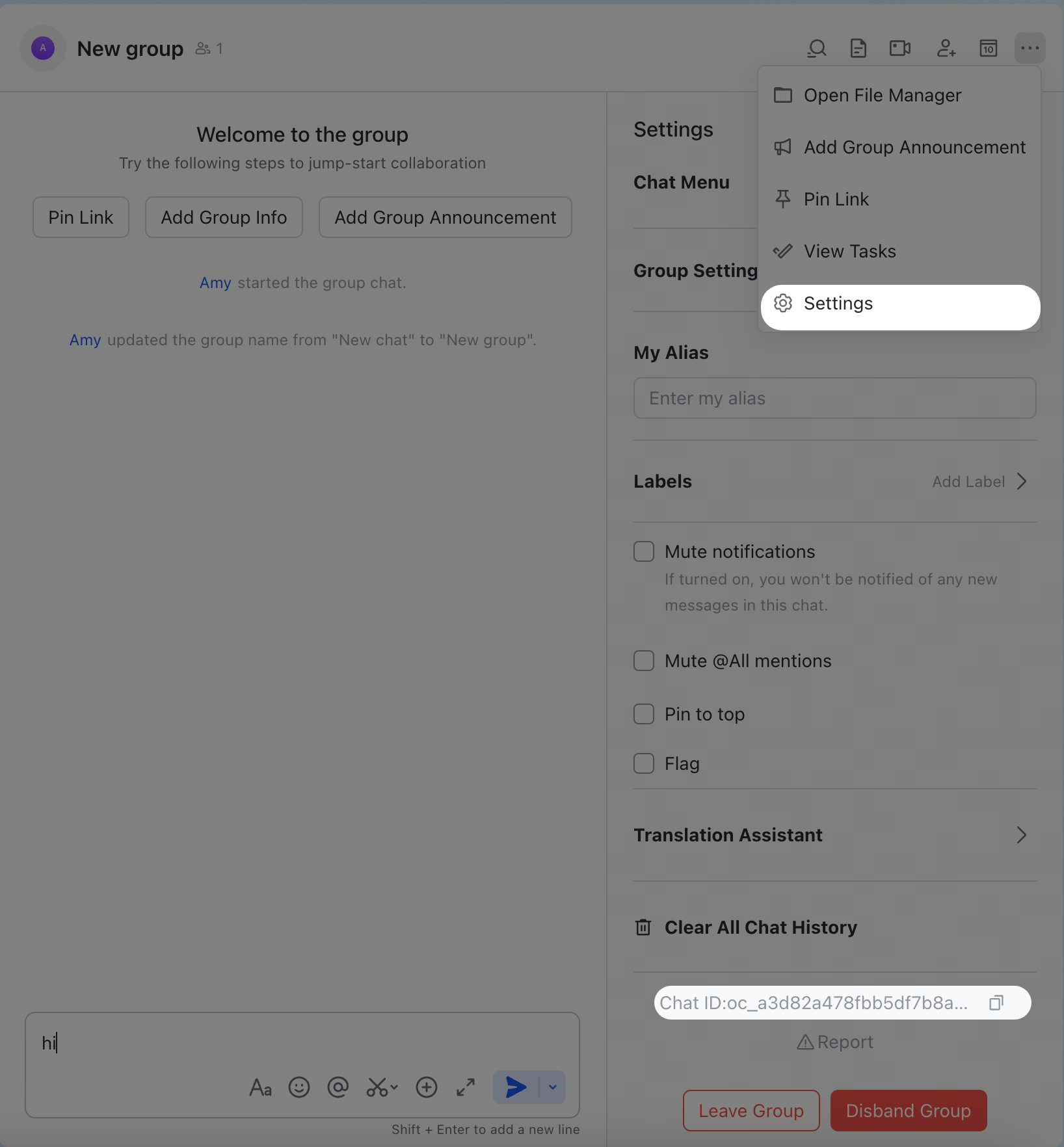
在飛書/Lark 中開啟群組,點擊右上角的功能表圖示,然後前往 設定。群組 ID (chat_id) 列在設定頁面上。
使用者 ID (open_id,格式:ou_xxx)
Section titled “使用者 ID (open_id,格式:ou_xxx)”
啟動 gateway,傳送私訊給機器人,然後檢查日誌:
Terminal window openclaw logs --follow
在日誌輸出中尋找 open_id。您也可以檢查待處理的配對請求:
Terminal window openclaw pairing list feishu
指令 說明 /status顯示機器人狀態 /reset重設目前的工作階段 /model顯示或切換 AI 模型
機器人在群組中不回應
Section titled “機器人在群組中不回應”
- 確保機器人已加入群組
- 確保您有 @提及機器人(預設為必填)
- 驗證
groupPolicy 不是 "disabled"
- 檢查日誌:
openclaw logs --follow
機器人未收到訊息
Section titled “機器人未收到訊息”
- 確保機器人已在飛書開放平台 / Lark 開發者平台發布並核准
- 確保事件訂閱包含
im.message.receive_v1
- 確保已選取 持久連線 (WebSocket)
- 確保已授予所有必要的權限範圍
- 確保閘道正在執行:
openclaw gateway status
- 檢查日誌:
openclaw logs --follow
飛書 App 無法回應 QR 設定
Section titled “飛書 App 無法回應 QR 設定”
- 重新執行設定:
openclaw channels login --channel feishu
- 選擇手動設定
- 在飛書開放平台,建立一個自建應用並複製其 App ID 和 App Secret
- 將這些憑證貼入設定精靈
App Secret 外洩
Section titled “App Secret 外洩”
- 在飛書開放平台 / Lark Developer 重設 App Secret
- 更新您的設定中的值
- 重新啟動閘道:
openclaw gateway restart
{ channels: { feishu: { defaultAccount: "main", accounts: { main: { appId: "cli_xxx", appSecret: "xxx", name: "Primary bot", tts: { providers: { openai: { voice: "shimmer" }, }, }, }, backup: { appId: "cli_yyy", appSecret: "yyy", name: "Backup bot", enabled: false, }, }, }, },}
當輸出 API 未指定 accountId 時,defaultAccount 會控制使用哪個帳戶。
`accounts.
.tts使用與messages.tts` 相同的結構,並深度合併至
全域 TTS 設定之上,因此多機器人飛書設定可以將共享的提供者
憑證保留在全域,同時針對每個帳戶僅覆寫語音、模型、角色或自動模式。
textChunkLimit - 輸出文字區塊大小 (預設:2000 字元)mediaMaxMb - 媒體上傳/下載限制 (預設:30 MB)
飛書/Lark 支援透過互動卡片進行串流回覆。啟用後,機器人會在產生文字時即時更新卡片。
{ channels: { feishu: { streaming: true, // enable streaming card output (default: true) blockStreaming: true, // opt into completed-block streaming }, },}
設定 streaming: false 以在一則訊息中傳送完整回覆。blockStreaming 預設為關閉;僅當您希望在最終回覆之前先刷新已完成的助手區塊時才啟用它。
使用兩個可選選項減少飛書/Lark API 呼叫次數:
typingIndicator (預設 true): 設定 false 以跳過輸入反應呼叫resolveSenderNames (預設 true): 設定 false 以跳過發送者資料查找
{ channels: { feishu: { typingIndicator: false, resolveSenderNames: false, }, },}
ACP 會話
Section titled “ACP 會話”
Feishu/Lark 支援私訊和群組主題訊息的 ACP。Feishu/Lark ACP 是由文字指令驅動的——沒有原生的斜線指令選單,因此請直接在對話中使用 /acp ... 訊息。
持續性 ACP 綁定
Section titled “持續性 ACP 綁定”
{ agents: { list: [ { id: "codex", runtime: { type: "acp", acp: { agent: "codex", backend: "acpx", mode: "persistent", cwd: "/workspace/openclaw", }, }, }, ], }, bindings: [ { type: "acp", agentId: "codex", match: { channel: "feishu", accountId: "default", peer: { kind: "direct", id: "ou_1234567890" }, }, }, { type: "acp", agentId: "codex", match: { channel: "feishu", accountId: "default", peer: { kind: "group", id: "oc_group_chat:topic:om_topic_root" }, }, acp: { label: "codex-feishu-topic" }, }, ],}
從聊天中啟動 ACP
Section titled “從聊天中啟動 ACP”
在 Feishu/Lark 私訊或串列中:
/acp spawn codex --thread here
--thread here 適用於私訊和 Feishu/Lark 主題訊息。綁定對話中的後續訊息會直接路由至該 ACP 會話。
使用 bindings 將 Feishu/Lark 私訊或群組路由至不同的代理程式。
{ agents: { list: [{ id: "main" }, { id: "agent-a", workspace: "/home/user/agent-a" }, { id: "agent-b", workspace: "/home/user/agent-b" }], }, bindings: [ { agentId: "agent-a", match: { channel: "feishu", peer: { kind: "direct", id: "ou_xxx" }, }, }, { agentId: "agent-b", match: { channel: "feishu", peer: { kind: "group", id: "oc_zzz" }, }, }, ],}
路由欄位:
match.channel: "feishu"match.peer.kind: "direct" (私訊) 或 "group" (群組聊天)match.peer.id: 使用者 Open ID (ou_xxx) 或群組 ID (oc_xxx)
請參閱 取得群組/使用者 ID 以取得查詢提示。
每個使用者的代理程式隔離 (動態代理程式建立)
Section titled “每個使用者的代理程式隔離 (動態代理程式建立)”
啟用 dynamicAgentCreation 以自動為每個私訊使用者建立 隔離的代理程式執行個體。每個使用者都擁有自己的:
- 獨立的工作區目錄
- 分離的
USER.md / SOUL.md / MEMORY.md
- 私密的對話歷史記錄
- 隔離的技能和狀態
這對於公開機器人至關重要,因為您希望每個使用者都擁有自己的私人 AI 助理體驗。
{ channels: { feishu: { dmPolicy: "open", allowFrom: ["*"], dynamicAgentCreation: { enabled: true, workspaceTemplate: "~/.openclaw/workspace-{agentId}", agentDirTemplate: "~/.openclaw/agents/{agentId}/agent", }, }, }, session: { // Critical: makes each user's DM their "main session" // Automatically loads USER.md / SOUL.md / MEMORY.md // For stronger isolation, use "per-channel-peer" instead dmScope: "main", },}
當新使用者發送他們的第一則私訊時:
- 通道會產生唯一的
agentId = feishu-{user_open_id}
- 在
workspaceTemplate 路徑建立新的工作區
- 註冊代理程式並為此使用者建立綁定
- 工作區輔助程式會在首次存取時確保引導檔案(
AGENTS.md、SOUL.md、USER.md 等)已存在
- 將此使用者所有後續訊息路由傳送至其專屬代理程式
設定 說明 預設值 channels.feishu.dynamicAgentCreation.enabled啟用自動每人代理程式建立 falsechannels.feishu.dynamicAgentCreation.workspaceTemplate動態代理程式工作區的路徑範本 ~/.openclaw/workspace-{agentId}channels.feishu.dynamicAgentCreation.agentDirTemplate代理程式目錄名稱範本 ~/.openclaw/agents/{agentId}/agentchannels.feishu.dynamicAgentCreation.maxAgents要建立的最大動態代理程式數量 無限制
範本變數:
{agentId} - 產生的代理程式 ID(例如 feishu-ou_xxxxxx){userId} - 傳送者的飛書 open_id(例如 ou_xxxxxx)
Session 範圍
Section titled “Session 範圍”
session.dmScope 控制直接訊息如何對應至代理程式 Session。這是一個影響所有頻道的全域設定。
數值 行為 適用於 "main"每個使用者的私訊會對應至其代理程式的主 Session 單使用者機器人,且您希望 USER.md / SOUL.md 自動載入 "per-channel-peer"每個(頻道 + 使用者)組合都會獲得獨立的 Session 需要更強隔離的公開多使用者機器人
取捨:使用 "main" 可啟用引導檔案(USER.md、SOUL.md、MEMORY.md)的自動載入,但這意味著所有頻道中的所有私訊都共用相同的 Session 金鑰模式。對於隔離性比引導檔案自動載入更重要的公開多使用者機器人,請考慮使用 "per-channel-peer" 並手動管理引導檔案。
{ session: { // For single-user personal bots: enables auto bootstrap loading dmScope: "main",
// For public multi-user bots: stronger isolation // dmScope: "per-channel-peer", },}
典型的多使用者部署
Section titled “典型的多使用者部署”
{ channels: { feishu: { appId: "cli_xxx", appSecret: "xxx", dmPolicy: "open", allowFrom: ["*"], groupPolicy: "open", requireMention: true, dynamicAgentCreation: { enabled: true, workspaceTemplate: "~/.openclaw/workspace-{agentId}", agentDirTemplate: "~/.openclaw/agents/{agentId}/agent", }, }, }, session: { // Choose dmScope based on your isolation needs: // "main" for bootstrap auto-loading, "per-channel-peer" for stronger isolation dmScope: "main", }, bindings: [], // Empty - dynamic agents auto-bind}
檢查 Gateway 日誌以確認動態建立是否正常運作:
feishu: creating dynamic agent "feishu-ou_xxxxxx" for user ou_xxxxxxworkspace: /Users/you/.openclaw/workspace-feishu-ou_xxxxxxfeishu: dynamic agent created, new route: agent:feishu-ou_xxxxxx:main
列出所有已建立的工作區:
Terminal window ls -la ~/.openclaw/workspace-*
- 工作區隔離:每個使用者都有自己的工作區目錄和 Agent 實例。在正常訊息流程中,使用者無法看到彼此的對話記錄或檔案。
- 安全性邊界:這是一種訊息上下文隔離機制,而非針對惡意共租戶的安全性邊界。Agent 程序和主機環境是共用的。
bindings 應為空白:動態 Agent 會自動註冊自己的綁定- 升級路徑:現有的手動綁定會與動態 Agent 並繼續運作
session.dmScope 是全域的:這會影響所有頻道,不僅僅是 Feishu
設定 描述 預設值 channels.feishu.enabled啟用/停用頻道 truechannels.feishu.domainAPI 網域 (feishu 或 lark) feishuchannels.feishu.connectionMode事件傳輸 (websocket 或 webhook) websocketchannels.feishu.defaultAccount出站路由的預設帳戶 defaultchannels.feishu.verificationTokenWebhook 模式所需 - channels.feishu.encryptKeyWebhook 模式所需 - channels.feishu.webhookPathWebhook 路由路徑 /feishu/eventschannels.feishu.webhookHostWebhook 綁定主機 127.0.0.1channels.feishu.webhookPortWebhook 綁定連接埠 3000`channels.feishu.accounts.
.appId | App ID | - | |channels.feishu.accounts.
.appSecret | App Secret | - | |channels.feishu.accounts.
.domain | 各帳戶的網域覆寫 |feishu | |channels.feishu.accounts.
.tts | 個帳號 TTS 覆蓋 |messages.tts | |channels.feishu.dmPolicy | 私訊政策 |allowlist | |channels.feishu.allowFrom | 私訊白名單 (open_id 清單) | [BotOwnerId] | |channels.feishu.groupPolicy | 群組政策 |allowlist | |channels.feishu.groupAllowFrom | 群組白名單 | - | |channels.feishu.requireMention | 在群組中要求 @提及 |true | |channels.feishu.groups.
.requireMention | 各群組 @提及覆蓋;明確 ID 也會將群組加入白名單模式 | 繼承 | |channels.feishu.groups.
.enabled | 啟用/停用特定群組 |true | |channels.feishu.dynamicAgentCreation.enabled | 啟用自動每個使用者 Agent 建立 |false | |channels.feishu.dynamicAgentCreation.workspaceTemplate| 動態 Agent 工作區路徑範本 |/.openclaw/workspace-{agentId} | |channels.feishu.dynamicAgentCreation.agentDirTemplate | Agent 目錄名稱範本 |/.openclaw/agents/{agentId}/agent| |channels.feishu.dynamicAgentCreation.maxAgents | 要建立的最大動態 Agent 數量 | 無限制 | |channels.feishu.textChunkLimit | 訊息區塊大小 |2000 | |channels.feishu.mediaMaxMb | 媒體大小限制 |30 | |channels.feishu.streaming | 串流卡片輸出 |true | |channels.feishu.blockStreaming | 已完成區塊回覆串流 |false | |channels.feishu.typingIndicator | 發送輸入中反應 |true | |channels.feishu.resolveSenderNames | 解析發送者顯示名稱 |true | |channels.feishu.tools.bitable | 啟用 Bitable/Base 工具 |true | |channels.feishu.tools.base |channels.feishu.tools.bitable的別名;若同時設定,明確的bitable優先 |true | |channels.feishu.accounts.
.tools.bitable | 每個帳號的 Bitable/Base 工具閘道 | 繼承 | |channels.feishu.accounts.
.tools.base |tools.bitable` 的每個帳號別名 | 繼承 |
支援的訊息類型
Section titled “支援的訊息類型”
- ✅ 文字
- ✅ 富文字 (貼文)
- ✅ 圖片
- ✅ 檔案
- ✅ 音訊
- ✅ 影片/媒體
- ✅ 貼圖
傳入的 Feishu/Lark 音訊訊息會被正規化為媒體佔位符,而不是原始的 file_key JSON。當設定 tools.media.audio 時,OpenClaw
會下載語音訊息資源,並在代理回合前執行共用的音訊轉錄,因此代理會收到口語轉錄文字。如果 Feishu
直接在音訊內容中包含轉錄文字,則會使用該文字而不需要再進行
另一次 ASR 呼叫。如果沒有音訊轉錄提供者,代理仍然會收到
`
` 佔位符加上已儲存的附件,而不是原始的 Feishu
資源內容。
- ✅ 文字
- ✅ 圖片
- ✅ 檔案
- ✅ 音訊
- ✅ 影片/媒體
- ✅ 互動式卡片 (包括串流更新)
- ⚠️ 富文字 (貼文樣式格式;不支援完整的 Feishu/Lark 編輯功能)
飛書/Lark 原生音訊氣泡使用飛書 audio 訊息類型,並要求
Ogg/Opus 上傳媒體 (file_type: "opus")。現有的 .opus 和 .ogg 媒體
會直接作為原生音訊發送。MP3/WAV/M4A 和其他可能的音訊格式
僅在回覆請求語音傳遞 (audioAsVoice / 訊息工具 asVoice,包括 TTS 語音筆記
回覆) 時,才會透過 ffmpeg 轉碼為 48kHz Ogg/Opus。一般的 MP3 附件保持為一般檔案。如果 ffmpeg 缺失或
轉換失敗,OpenClaw 將退回為檔案附件並記錄原因。
- ✅ 內聯回覆
- ✅ 串列回覆
- ✅ 媒體回覆在回覆串列訊息時會保持串列感知
對於 groupSessionScope: "group_topic" 和 "group_topic_sender",原生
飛書/Lark 主題群組使用事件 thread_id (omt_*) 作為標準
主題會話金鑰。如果原生主題起始事件省略了 thread_id,OpenClaw
會在路由回合之前從飛書補充它。OpenClaw 轉換為串列的一般群組回覆繼續使用回覆根訊息 ID (om_*),以便
第一個回合和後續回合保持在同一個會話中。