群組
OpenClaw 在所有表面上對待群組聊天的方式是一致的:Discord、iMessage、Matrix、Microsoft Teams、Signal、Slack、Telegram、WhatsApp、Zalo。
對於除非代理程式明確傳送可見訊息否則應提供安靜背景的永久房間,請參閱 Ambient room events。
初學者介紹(2 分鐘)
Section titled “初學者介紹(2 分鐘)”OpenClaw「寄居」在您自己的訊息帳號上。沒有單獨的 WhatsApp 機器人使用者。如果您在某個群組中,OpenClaw 就能看到該群組並在那裡回應。
預設行為:
- 群組受到限制(
groupPolicy: "allowlist")。 - 除非您明確停用提及閘控,否則回覆需要提及。
- 群組/頻道中的可見回覆預設使用
message工具。
翻譯:允許清單上的發送者可以透過提及來觸發 OpenClaw。
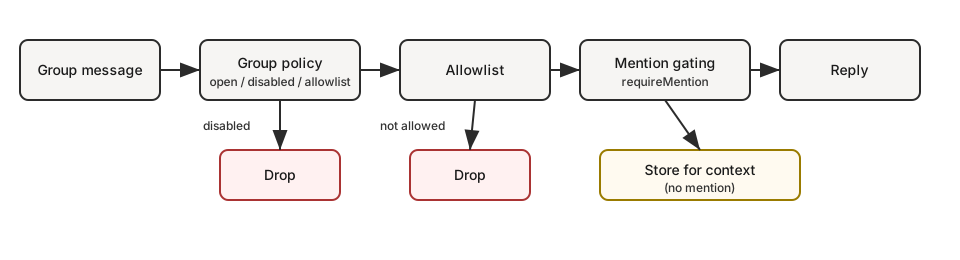
快速流程(群組訊息會發生什麼事):
groupPolicy? disabled -> dropgroupPolicy? allowlist -> group allowed? no -> droprequireMention? yes -> mentioned? no -> store for context onlymention/reply/command/DM -> user requestalways-on group chatter -> user request, or room event when configured對於一般的群組/頻道請求,OpenClaw 預設為 messages.groupChat.visibleReplies: "automatic"。除非您將房間設為僅使用訊息工具輸出,否則最終的助理文字會透過舊版可見回覆路徑發佈。
當共享房間應讓代理程式透過呼叫 message(action=send) 來決定何時說話時,請使用 messages.groupChat.visibleReplies: "message_tool"。這最適用於由最新世代、工具可靠的模型(例如 GPT 5.5)支援的群組房間。如果模型錯過該工具並傳回實質的最終文字,OpenClaw 會將該最終文字保持私密,而不是發佈到房間。
對於較弱的模型或無法可靠理解僅限工具傳遞的執行時環境,請使用 "automatic"。在自動模式下,代理程式的最終助理文字是可見的來源回覆路徑,因此無法一致呼叫 message(action=send) 的模型仍可正常回答。
如果在有效的工具原則下無法使用訊息工具,OpenClaw 將
回退到自動可見回覆,而不是靜默地隱藏回應。
openclaw doctor 會警告此不匹配。
對於直接聊天和任何其他來源事件,請使用 messages.visibleReplies: "message_tool" 在全域範圍內套用相同的僅限工具的可見回覆行為。內部 WebChat 直接對話預設為自動最終回覆傳遞,以便 Pi 和 Codex 接收相同的可見回覆合約。設定 messages.visibleReplies: "message_tool" 以特意要求 message(action=send) 用於可見輸出。messages.groupChat.visibleReplies 仍然是針對群組/頻道房間的更具體的覆寫設定。
這取代了舊的模式,即強迫模型在大多數潛伏模式輪次中回答 NO_REPLY。在僅限工具模式下,提示並未定義 NO_REPLY 合約。不做任何可見的操作僅意味著不呼叫訊息工具。
外掛擁有的對話綁定是例外情況。一旦外掛綁定了執行緒並接收了輸入輪次,外掛傳回的回覆即為可見的綁定回應;它不需要 message(action=send)。該回覆是外掛執行階段輸出,而非私有的模型最終文字。
對於直接的群組請求,仍會發送輸入指示器。當啟用環境永遠在線房間事件時,除非代理程式呼叫訊息工具,否則這些事件將保持嚴格且安靜。
Sessions 預設會隱藏詳細的工具/進度摘要。在除錯時使用 /verbose on
以顯示目前工作階段的那些摘要,並使用
/verbose off 以返回僅限最終回覆的行為。相同的詳細狀態
適用於直接聊天、群組、頻道和論壇主題。
若要將未提及的永遠在線群組閒聊作為安靜的房間內容而非使用者請求提交,請使用 Ambient room events:
{ messages: { groupChat: { unmentionedInbound: "room_event", }, },}預設值為 unmentionedInbound: "user_request"。
提及的訊息、指令、中止請求和私人訊息 (DM) 仍保持為使用者請求。
若要求群組/頻道請求的可見輸出必須透過訊息工具進行:
{ messages: { groupChat: { visibleReplies: "message_tool", }, },}在儲存檔案後,閘道會熱重載 messages 設定。僅當部署中停用
檔案監看或設定重新載入時才需要重新啟動。
若要求每一個來源聊天的可見輸出都必須透過訊息工具進行:
{ messages: { visibleReplies: "message_tool", },}原生斜線指令(Discord、Telegram 和其他支援原生指令的平台)會繞過 visibleReplies: "message_tool" 並始終可見回覆,以便平台原生的指令 UI 能收到其預期的回應。這僅適用於已驗證的原生指令輪次;文字輸入的 /... 指令和一般聊天輪次仍遵循設定的群組預設值。
內容可見性與允許清單
Section titled “內容可見性與允許清單”群組安全性涉及兩種不同的控制:
- 觸發授權:誰可以觸發代理程式(
groupPolicy、groups、groupAllowFrom、特定頻道的允許清單)。 - 內容可見性:哪些補充內容會被注入到模型中(回覆文字、引言、執行緒歷史、轉發的中繼資料)。
預設情況下,OpenClaw 優先考慮正常的聊天行為,並儘可能保留接收到的內容。這意味著允許清單主要決定誰可以觸發動作,而不是對每個引言或歷史片段設置通用的編輯邊界。
目前行為因平台而異
- 某些平台已針對特定路徑中的補充內容套用基於發送者的過濾(例如 Slack 執行緒植入、Matrix 回覆/執行緒查詢)。
- 其他平台仍會將引言/回覆/轉發的內容按接收原樣傳遞。
強化方向(計劃中)
contextVisibility: "all"(預設)保持目前按接收原樣處理的行為。contextVisibility: "allowlist"將補充內容過濾為僅限允許清單中的發送者。contextVisibility: "allowlist_quote"是allowlist加上一個明確的引言/回覆例外。
在此強化模型於各平台間一致實作之前,預計各平台會有差異。
如果您想要…
| 目標 | 設定方式 |
|---|---|
| 允許所有群組但僅在 @提及 時回覆 | groups: { "*": { requireMention: true } } |
| 停用所有群組回覆 | groupPolicy: "disabled" |
| 僅限特定群組 | groups: { "<group-id>": { ... } }(無 "*" 鍵) |
| 僅您自己可以在群組中觸發 | groupPolicy: "allowlist",groupAllowFrom: ["+1555..."] |
| 跨通道重用同一個受信任的傳送者集合 | groupAllowFrom: ["accessGroup:operators"] |
關於可重複使用的傳送者允許清單,請參閱存取群組。
工作階段金鑰
Section titled “工作階段金鑰”- 群組工作階段使用
agent:<agentId>:<channel>:group:<id>工作階段金鑰(房間/頻道使用agent:<agentId>:<channel>:channel:<id>)。 - Telegram 論壇主題會將
:topic:<threadId>加到群組 ID,讓每個主題都有自己的工作階段。 - 直接訊息使用主要工作階段(若已設定,則使用每位傳送者專屬工作階段)。
- 群組工作階段會略過心跳檢測。
模式:個人 DM + 公開群組(單一代理程式)
Section titled “模式:個人 DM + 公開群組(單一代理程式)”是的 — 如果您的「個人」流量是 DM 而「公開」流量是 群組,這個模式運作得很好。
原因:在單一代理程式模式下,DM 通常會進入 主要 工作階段金鑰(agent:main:main),而群組總是使用 非主要 工作階段金鑰(agent:main:<channel>:group:<id>)。如果您使用 mode: "non-main" 啟用沙盒化,這些群組工作階段會在設定的沙盒後端中執行,而您的主要 DM 工作階段則維持在主機上。如果您未選擇後端,Docker 是預設的後端。
這讓您擁有一個代理程式「大腦」(共享工作區 + 記憶體),但具備兩種執行態勢:
- DM:完整工具(主機)
- 群組:沙盒 + 受限工具
{ agents: { defaults: { sandbox: { mode: "non-main", // groups/channels are non-main -> sandboxed scope: "session", // strongest isolation (one container per group/channel) workspaceAccess: "none", }, }, }, tools: { sandbox: { tools: { // If allow is non-empty, everything else is blocked (deny still wins). allow: ["group:messaging", "group:sessions"], deny: ["group:runtime", "group:fs", "group:ui", "nodes", "cron", "gateway"], }, }, },}想要「群組只能看到資料夾 X」而不是「無主機存取權」?保留 workspaceAccess: "none" 並且僅將允許清單中的路徑掛載到沙盒中:
{ agents: { defaults: { sandbox: { mode: "non-main", scope: "session", workspaceAccess: "none", docker: { binds: [ // hostPath:containerPath:mode "/home/user/FriendsShared:/data:ro", ], }, }, }, },}相關:
- 設定金鑰與預設值:閘道設定
- 除錯工具被封鎖的原因:沙盒 vs 工具原則 vs 提升權限
- Bind 掛載詳細資訊:沙盒化
- UI 標籤盡可能使用
displayName,格式為<channel>:<token>。 #room保留給房間/頻道;群組聊天使用g-<slug>(小寫,空格 ->-,保留#@+._-)。
控制每個頻道如何處理群組/房間訊息:
{ channels: { whatsapp: { groupPolicy: "disabled", // "open" | "disabled" | "allowlist" groupAllowFrom: ["+15551234567"], }, telegram: { groupPolicy: "disabled", groupAllowFrom: ["123456789"], // numeric Telegram user id (wizard can resolve @username) }, signal: { groupPolicy: "disabled", groupAllowFrom: ["+15551234567"], }, imessage: { groupPolicy: "disabled", groupAllowFrom: ["chat_id:123"], }, msteams: { groupPolicy: "disabled", }, discord: { groupPolicy: "allowlist", guilds: { GUILD_ID: { channels: { help: { allow: true } } }, }, }, slack: { groupPolicy: "allowlist", channels: { "#general": { allow: true } }, }, matrix: { groupPolicy: "allowlist", groupAllowFrom: ["@owner:example.org"], groups: { "!roomId:example.org": { enabled: true }, "#alias:example.org": { enabled: true }, }, }, },}| 政策 | 行為 |
|---|---|
"open" | 群組略過允許清單;提及閘門仍然適用。 |
"disabled" | 完全封鎖所有群組訊息。 |
"allowlist" | 僅允許符合設定允許清單的群組/房間。 |
各頻道備註
groupPolicy與提及閘門(mention-gating,需要 @mentions)是分開的。- WhatsApp/Telegram/Signal/iMessage/Microsoft Teams/Zalo:使用
groupAllowFrom(後備方案:明確的allowFrom)。 - Signal:
groupAllowFrom可以符合傳入的 Signal 群組 ID 或傳送者電話/UUID。 - DM 配對核准(
*-allowFrom存儲條目)僅適用於 DM 存取;群組傳送者授權保持對群組允許清單的明確規定。 - Discord:允許清單使用 `channels.discord.guilds.
.channels。 - Slack:允許清單使用 channels.slack.channels。 - Matrix:允許清單使用 channels.matrix.groups。建議優先使用房間 ID 或別名;已加入房間的名稱查詢是盡力而為的,未解析的名稱會在執行時被忽略。使用 channels.matrix.groupAllowFrom來限制傳送者;也支援每個房間users 允許清單。 - 群組 DM 受單獨控制(channels.discord.dm.,channels.slack.dm.)。 - Telegram 允許清單可以符合使用者 ID(”123456789”,”telegram:123456789”,”tg:123456789”)或使用者名稱(”@alice”或”alice”);前綴區分大小寫。 - 預設為 groupPolicy: “allowlist”;如果您的群組允許清單為空,群組訊息將被阻擋。 - 執行時安全性:當提供者區塊完全缺失(缺少 channels.
)時,群組原則會退回至預設阻擋模式(通常是 allowlist),而不是繼承 channels.defaults.groupPolicy`。
快速心態模型(群組訊息的評估順序):
groupPolicy
groupPolicy(open/disabled/allowlist)。Group allowlists
群組允許清單(
*.groups,*.groupAllowFrom,特定頻道允許清單)。提及閘道
提及閘道(
requireMention,/activation)。
提及閘道(預設)
Section titled “提及閘道(預設)”除非針對個別群組覆寫,否則群組訊息需要提及才會觸發。預設值依各子系統儲存於 *.groups."*" 之下。
當頻道支援回覆中繼資料時,回覆機器人訊息視為隱含提及。在支援引述中繼資料的頻道上,引述機器人訊息也可視為隱含提及。目前內建的案例包括 Telegram、WhatsApp、Slack、Discord、Microsoft Teams 和 ZaloUser。
{ channels: { whatsapp: { groups: { "*": { requireMention: true }, }, }, telegram: { groups: { "*": { requireMention: true }, "123456789": { requireMention: false }, }, }, imessage: { groups: { "*": { requireMention: true }, "123": { requireMention: false }, }, }, }, agents: { list: [ { id: "main", groupChat: { mentionPatterns: ["@openclaw", "openclaw", "\\+15555550123"], historyLimit: 50, }, }, ], },}設定提及模式的範圍
Section titled “設定提及模式的範圍”設定的 mentionPatterns 是 regex 備用觸發器。當平台未公開原生機器人提及,或當您希望純文字(例如 openclaw:)被視為提及時使用它們。原生平台提及是分開的:當 Discord、Slack、Telegram、Matrix 或其他頻道能證明訊息明確提及機器人時,即使設定的 regex 模式被拒絕,該原生提及仍會觸發。
預設情況下,設定的提及模式會套用於頻道將提供者和對話事實傳入提及偵渲的所有地方。為了避免廣泛的模式在每個群組中喚醒代理程式,請使用 channels.<channel>.mentionPatterns 針對每個頻道設定其範圍。
當頻道的 regex 提及模式應預設關閉時,請使用 mode: "deny",然後使用 allowIn 讓特定房間加入:
{ messages: { groupChat: { mentionPatterns: ["\\bopenclaw\\b", "\\bops bot\\b"], }, }, channels: { slack: { mentionPatterns: { mode: "deny", allowIn: ["C0123OPS"], }, }, },}當 regex 提及模式應廣泛套用時,請使用預設的 mode: "allow"(或省略 mode),然後在喧鬧的房間中使用 denyIn 將其關閉:
{ messages: { groupChat: { mentionPatterns: ["\\bopenclaw\\b"], }, }, channels: { telegram: { mentionPatterns: { denyIn: ["-1001234567890", "-1001234567890:topic:42"], }, }, },}原則解析:
| 欄位 | 效果 |
|---|---|
mode: "allow" | 除非對話 ID 位於 denyIn 中,否則會啟用 regex 提及模式。這是預設值。 |
mode: "deny" | 除非對話 ID 位於 allowIn 中,否則會停用 regex 提及模式。 |
allowIn | 在拒絕模式下啟用 regex 提及模式的對話 ID。 |
denyIn | 停用正則表達式提及模式的交談 ID。如果兩者都包含相同的 ID,則 denyIn 優先於 allowIn。 |
目前支援的範圍正則表達式策略:
| 頻道 | 用於 allowIn / denyIn 的 ID |
|---|---|
| Discord | Discord 頻道 ID。 |
| Matrix | Matrix 房間 ID。 |
| Slack | Slack 頻道 ID。 |
| Telegram | 群組聊天 ID,或論壇主題的 chatId:topic:threadId。 |
WhatsApp 交談 ID,例如 [email protected]。 |
當該頻道支援多個帳戶時,帳戶層級的頻道設定可以在 channels.<channel>.accounts.<accountId>.mentionPatterns 下設定相同的策略。針對該帳戶,帳戶策略優先於頂層頻道策略。
提及篩選說明
mentionPatterns是不區分大小寫的安全正則表達式模式;無效的模式和不安全的巢狀重複形式會被忽略。- 提供明確提及的平台仍然會通過;設定的正則表達式模式僅作為後備方案。
- `channels.
.mentionPatterns.mode: “deny”預設會停用該頻道的已設定提及模式;使用allowIn重新選擇特定的對話。 -channels.
.mentionPatterns.denyIn 會針對特定的對話 ID 停用已設定的提及模式,而原生的平台 @提及仍然會通過。 - 每個代理的覆寫:agents.list[].groupChat.mentionPatterns(當多個代理共用一個群組時很有用)。 - 只有在可以進行提及偵測(設定原生提及或 mentionPatterns)時,才會強制執行提及篩選。 - 將群組或發送者加入允許清單並不會停用提及篩選;當所有訊息都應觸發時,將該群組的 requireMention設定為false。 - 自動群組聊天提示上下文每次輪次都會攜帶已解析的靜音回覆指示;工作區檔案不應重複 NO_REPLY機制。 - 允許自動靜音回覆的群組會將純空或僅推理的模型輪次視為靜音,相當於NO_REPLY。直接聊天從不接收 NO_REPLY指導,且僅使用訊息工具的群組回覆會透過不呼叫message(action=send)保持靜音。 - 氛圍常時群組交談預設使用使用者請求語意。設定messages.groupChat.unmentionedInbound: “room_event”將其作為靜音上下文提交。請參閱 [Ambient room events](/zh-Hant/channels/ambient-room-events) 了解設定範例。 - 房間事件不會儲存為假使用者請求,並且來自無訊息工具房間事件的私人助理文字不會重新播放為聊天記錄。 - Discord 預設值位於channels.discord.guilds.”*“(可依伺服器/頻道覆寫)。 - 群組歷史記錄上下文在頻道之間統一封裝。已設提及篩選的群組會保留擱置的已跳過訊息;當頻道支援時,常時群組也可能保留最近的已處理房間訊息。使用 messages.groupChat.historyLimit作為全域預設值,並使用channels.
.historyLimit(或 channels.
.accounts.*.historyLimit)進行覆寫。設定 0` 以停用。
群組/頻道工具限制(可選)
Section titled “群組/頻道工具限制(可選)”部分頻道設定支援限制特定群組/房間/頻道內可用的工具。
tools:允許/拒絕整個群組的工具。toolsBySender:群組內按發送者覆寫。使用明確的金鑰前綴:channel:<channelId>:<senderId>、id:<senderId>、e164:<phone>、username:<handle>、name:<displayName>以及"*"萬用字元。頻道 ID 使用標準的 OpenClaw 頻道 ID;別名如teams會正規化為msteams。舊版無前綴的金鑰仍被接受,並僅作為id:進行匹配。
解析順序(越具體者優先):
Group toolsBySender
群組/頻道
toolsBySender匹配。Group tools
群組/頻道
tools。Default toolsBySender
預設 (
"*")toolsBySender匹配。Default tools
預設 (
"*")tools。
範例 (Telegram):
{ channels: { telegram: { groups: { "*": { tools: { deny: ["exec"] } }, "-1001234567890": { tools: { deny: ["exec", "read", "write"] }, toolsBySender: { "id:123456789": { alsoAllow: ["exec"] }, }, }, }, }, },}群組允許清單
Section titled “群組允許清單”當設定 channels.whatsapp.groups、channels.telegram.groups 或 channels.imessage.groups 時,這些金鑰會作為群組允許清單。使用 "*" 可允許所有群組,同時仍設定預設提及行為。
常見用途(複製/貼上):
{ channels: { whatsapp: { groupPolicy: "disabled" } },}{ channels: { whatsapp: { groups: { }, }, },}{ channels: { whatsapp: { groups: { "*": { requireMention: true } }, }, },}{ channels: { whatsapp: { groupPolicy: "allowlist", groupAllowFrom: ["+15551234567"], groups: { "*": { requireMention: true } }, }, },}啟用(僅限擁有者)
Section titled “啟用(僅限擁有者)”群組擁有者可以切換各群組的啟用狀態:
/activation mention/activation always
擁有者由 channels.whatsapp.allowFrom 決定(若未設定則為機器人自己的 E.164)。將指令作為獨立訊息發送。其他介面目前會忽略 /activation。
Context 欄位
Section titled “Context 欄位”群組傳入的 payload 會設定:
ChatType=groupGroupSubject(如果已知)GroupMembers(如果已知)WasMentioned(提及閘道結果)- Telegram 論壇主題還包括
MessageThreadId和IsForum。
代理程式系統提示會在新的群組會話的第一輪中包含群組介紹。它會提醒模型像人類一樣回應、避免使用 Markdown 表格、盡量減少空行並遵循正常的聊天間距,以及避免輸入字面意義的 \n 序列。來自頻道的群組名稱和參與者標籤會呈現為被圍欄包圍的不受信任元數據,而非內聯系統指令。
iMessage 特定事項
Section titled “iMessage 特定事項”- 在路由或加入允許清單時,建議優先使用
chat_id:<id>。 - 列出聊天:
imsg chats --limit 20。 - 群組回覆一律會傳回同一個
chat_id。
WhatsApp 系統提示
Section titled “WhatsApp 系統提示”請參閱 WhatsApp 以了解標準的 WhatsApp 系統提示規則,包括群組與直接提示解析、萬用字元行為以及帳號覆寫語意。
WhatsApp 特定事項
Section titled “WhatsApp 特定事項”請參閱 群組訊息 以了解 WhatsApp 專屬行為(歷史紀錄注入、提及處理細節)。